#
PostParams
PostParams are a technology that allow generative tokens to evolve over time while preserving core artistic intent. Configurable parameters are stored on the blockchain and can be updated over time. Artists define what PostParams exist, how they can be changed, and who can make changes.
Some projects that have used PostParams to enhance collector experiece and artistic expression include:
- Quine by Larva Labs
- Gas Wars by Jack Butcher
- LIFT by Snowfro
- DDUST by Jiwa
- Broken Dreams by Manuel Larino x The Generative Art Museum
- Send/Receive by Snowfro
- Diggly Collects All by DCA
#
Compatibility
Recent Art Blocks Engine Flex NFTs (core version v3.2.5+) support configurable PostParams. If you need an updated core contract, please contact the Art Blocks team.
#
Quick Start
The Creator Dashboard provides integration snippets as you configure PostParams for your project. The examples below demonstrate the standard integration pattern.
#
Accessing PostParams Data
PostParams are injected into your script via the tokenData object. Based on your project configuration, the PostParam dependency is typically at index 0:
// Access the PostParam dependency (external asset dependency index: 0)
const postParams = tokenData.externalAssetDependencies[0];
You can verify the correct index in the Creator Dashboard under Scripts => Flex Assets. The PostParam asset will appear as an external asset dependency with text #web3call-contract#.
#
Accessing Individual Parameters
Each parameter is accessible via the data object. All values are returned as strings or undefined if not yet configured for a token:
// uint - value will be between '0' and '9999', or undefined
const featuredSquiggle = postParams?.data?.["featuredSquiggle"];

// color - value will be hex color string like '#ff5733', or undefined
const customColor = postParams?.data?.["customColor"];

// int - value will be between '-5' and '10', or undefined
const myInt = postParams?.data?.["myInt"];

// decimal - value will be between '0' and '5.5', or undefined
const myDecimal = postParams?.data?.["myDecimal"];

// bool - value will be 'true', 'false', or undefined
const pfpMode = postParams?.data?.["PFP-Mode"];

// timestamp - value will be Unix timestamp string (seconds since 1970), or undefined
const birthday = postParams?.data?.["birthday"];

// string - value will be a text string, or undefined
const name = postParams?.data?.["name"];
#
Handling Undefined Values with Fallbacks
Since PostParams may be undefined (not yet configured by the collector), you should provide hash-based fallback values to ensure deterministic behavior:
const postParams = tokenData.externalAssetDependencies[0];

// Helper: parse integer PostParam with hash-based fallback
function getPpInt(ppVal, hashBasedVal) {
  const n = parseInt(ppVal);
  return isNaN(n) ? hashBasedVal : n;
}

// Helper: parse boolean PostParam with hash-based fallback
function getPpBool(ppVal, hashBasedVal) {
  if (ppVal === "true") return true;
  if (ppVal === "false") return false;
  return hashBasedVal;
}

// Example usage with hash-based random generator R
const numShapes = getPpInt(
  postParams?.data?.["NumShapes"],
  R.random_int(10, 100)
);
const animate = getPpBool(postParams?.data?.["Animate"], R.random_dec() < 0.5);
const backgroundColor = postParams?.data?.["BackgroundColor"] ?? "#ffffff";
#
Enum Example: Color Palettes
When using enum PostParams (like color palettes), always call the PRNG before the conditional to ensure deterministic behavior regardless of PostParam state:
// Define palettes in script (matching enum values in PostParam configuration)
let palettes = [
  {
    name: "Midnight Citrus",
    colors: ["#0f0f1c", "#ffcc00", "#ff7f11", "#ffa69e", "#4d194d"],
  },
  {
    name: "Electric Bloom",
    colors: ["#8ecae6", "#219ebc", "#023047", "#ffb703", "#fb8500"],
  },
  {
    name: "Forest Neon",
    colors: ["#073b3a", "#0b6e4f", "#08a045", "#d4d700", "#fdfcdc"],
  },
];

const postParams = tokenData.externalAssetDependencies[0];

// Always calculate hash-based fallback first to ensure deterministic PRNG calls
const hashBasedPalette = R.random_choice(palettes);
const palette =
  palettes.find((p) => p.name === postParams?.data?.["Palette"]) ||
  hashBasedPalette;
#
Supported Parameter Types
#
Authorization Methods
Artists configure who can modify each parameter:
- Artist: Only the project artist can modify
- Token Owner: The current token holder can modify
- Address/Smart Contract: A specific address or contract has modification rights
#
Parameter Constraints
- Min/Max: Numeric bounds for integer and decimal types
- Lock Date: Date after which the parameter can never be changed
#
Augmentation Hooks
PostParams support augmentation hooks that inject live on-chain data into your project script. The Creator Dashboard provides configuration for both standard and custom hooks.
#
Standard Hooks
The following standard augmentation hooks are available (this list is regularly updated):
#
Custom Hooks
Both read augmentation hooks and post-config hooks support assigning custom hook contracts. This enables injecting any live on-chain data into your project script.
The Art Blocks team has published example hook contracts in the Art Blocks Contracts GitHub repository. Examples include:
- Token owner's address and ETH balance
- Price of Ethereum
- Chromie Squiggle's floor price
- Block parameters such as gas price
- Chainlink oracle results
Custom hooks may require Solidity development. Please reach out to the Art Blocks team to explore ideas in this area.
#
Configuring PostParams (Creator Dashboard)
The Creator Dashboard is the primary interface for configuring your project's PostParams:
- Parameter names
- Parameter types and values
- Parameter constraints (min, max, lock dates)
- Authorization settings
- Augmentation hooks (standard and custom)
The dashboard provides real-time integration snippets as you add parameters, making it easy to copy the exact code needed for your project script.
PostParams support download/upload from a json file, making migration from testnet to mainnet straightforward.
#
Testing on Artist Staging
For a full end-to-end test of PostParams on artist-staging:
- Navigate to your project in the Creator Dashboard
- Go to the Outputs tab
- Select a token
- Click the "Token page preview" link
Even if your staging project is not set to active, you will be able to view and edit your tokens when logged in with your artist wallet on the artist-staging website. This allows you to preview the full PostParam editing experience before activation.
#
Collector Configuration
Token owners can configure PostParams for their tokens on artblocks.io:
- Navigate to the token's page
- Log in with a wallet that has authority to change parameters (or is a valid delegate on delegate.xyz v2)
- Preview changes before committing them to the blockchain
- Submit the transaction to permanently record the changes as part of the token's provenance
#
PostParams as Token Features
PostParams may be integrated into your token features logic in two ways:
(Recommended) The
tokenDataobject is injected into your features script, and may be accessed in the same way as your project script. This enables full control over how PostParams translate to token features.Direct Override: For convenience, PostParams can override token features directly. If a PostParam shares the same name as a feature, the PostParam value will override the feature value after it is configured.
#
Locking Parameters
Artists can configure parameters to lock at a specific date and time at the project level. Once locked, parameters can never be unlocked, cementing their values permanently.
#
Creative Possibilities
PostParams enable a wide range of creative directions:
- Collector Customization: Toggle between color palettes, visual styles, or animation behaviors within artist-defined bounds
- Artist-Collector Collaboration: Both artist and collector have specific controls over different aspects
- Physical Art Connections: Configure PostParams before physical production, bridging digital and physical realms
- Living Artworks: Pieces that evolve over time through interactions or changing parameters
- Network Effects: Multiple token owners influence different aspects of related artworks
- Real-World Data: Art that reacts to on-chain data via augmentation hooks
Have an idea? Reach out to the Art Blocks team with questions! We are still figuring out what is possible with PostParams!
#
Supplemental Information
#
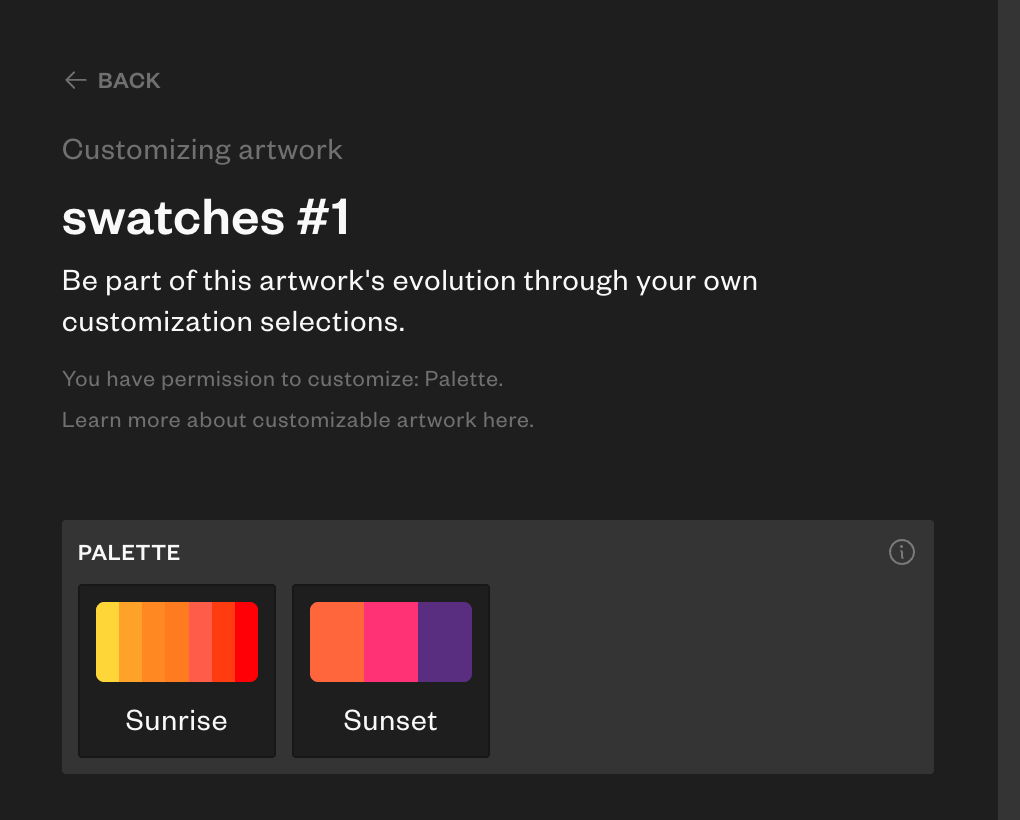
Color Swatch on Frontend Edit Forms
If your project has an enum PostParam that you would like to represent with color swatches on the edit form, please reach out in the Art Blocks Discord channels and provide us with the following json data:
{
    "type": "color-swatch",
    "data": {
        "Sunrise": [
            "#FFF0D5",
            "#2e3333",
            "#3e9198"
        ],
        "Sunset": [
            "#faf8eb",
            "#30282d",
            "#437742",
            "#836c48"
        ],
        ...
    }
}
This results in the following styling on the Art Blocks website: